
How Does IPTV Work? IPTV Streaming Explained for Australia
 Declan Mowbray
📅 June 29, 2026
⏱ 7 min read
Declan Mowbray
📅 June 29, 2026
⏱ 7 min read
How does IPTV work? In one line: IPTV works by converting television and video into compressed digital data, delivering it across the internet, and decoding it through an app on your smart TV, phone, or streaming device. This guide follows that journey end to end — from the content source to the picture on your screen — and explains the technology, the servers, and the terms behind it, in plain language.
We’ll keep this focused on the mechanics. If you want the broader picture of what IPTV is, its benefits, and alternatives, start with our companion guide on what IPTV is in Australia.
What Does IPTV Mean?
IPTV stands for Internet Protocol Television — live TV and on-demand video delivered over an internet connection instead of a cable, satellite, or antenna signal. That’s the short version. For the full definition, benefits, and how it compares to traditional TV, see our what is IPTV in Australia guide. The rest of this article focuses on how that delivery actually happens.
How Does IPTV Work, Step by Step?
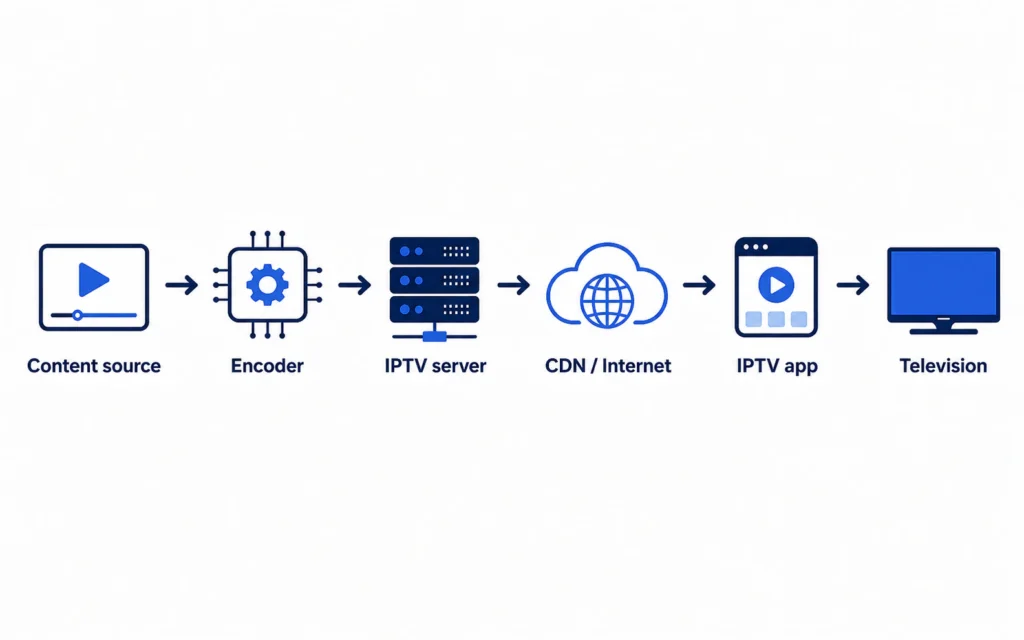
IPTV works by moving video through a chain of stages, turning a broadcast feed into data packets your device can rebuild into picture and sound. Here’s the full journey:
Content source → Encoder → IPTV server → CDN / Internet → IPTV app → Your TV
Step 1 — The provider receives the content. It starts with the source: live broadcast feeds, satellite downlinks, and stored video files. A legitimate service has the rights to distribute this content.
Step 2 — Video is encoded and compressed. Raw video is far too large to stream, so encoders compress it using codecs such as H.264 (AVC) or the more efficient H.265 (HEVC), which delivers the same quality using roughly half the bandwidth.
Step 3 — IPTV servers organise the streams. Servers arrange the compressed video into live channels and video-on-demand libraries, authenticate subscribers, and supply electronic program guide (EPG) data.
Step 4 — A CDN delivers the stream. A content delivery network (CDN) routes the data through servers positioned near viewers. Servers closer to Australian users can reduce latency and interruptions — though no setup can promise perfectly buffer-free playback.
Step 5 — Your device requests a channel. Your IPTV app, smart TV, or set-top box sends a request using your login details, often via an M3U playlist or Xtream Codes API.
Step 6 — The player decodes the data. The app receives the data packets, decodes them back into video and audio, and displays the channel on your screen — usually within a second or two.
How Does Live IPTV Work?
Live IPTV works by streaming a continuous feed that your player joins the moment you select a channel. On managed, private networks, providers can use multicast — one stream shared efficiently among many viewers. Over the public internet, services typically use unicast HTTP streaming, where each viewer receives their own stream. Either way, there’s a small broadcast delay (often 10–30 seconds) between the live event and your screen, because the video has to be encoded, delivered, and decoded along the way.
How Does IPTV Video on Demand Work?
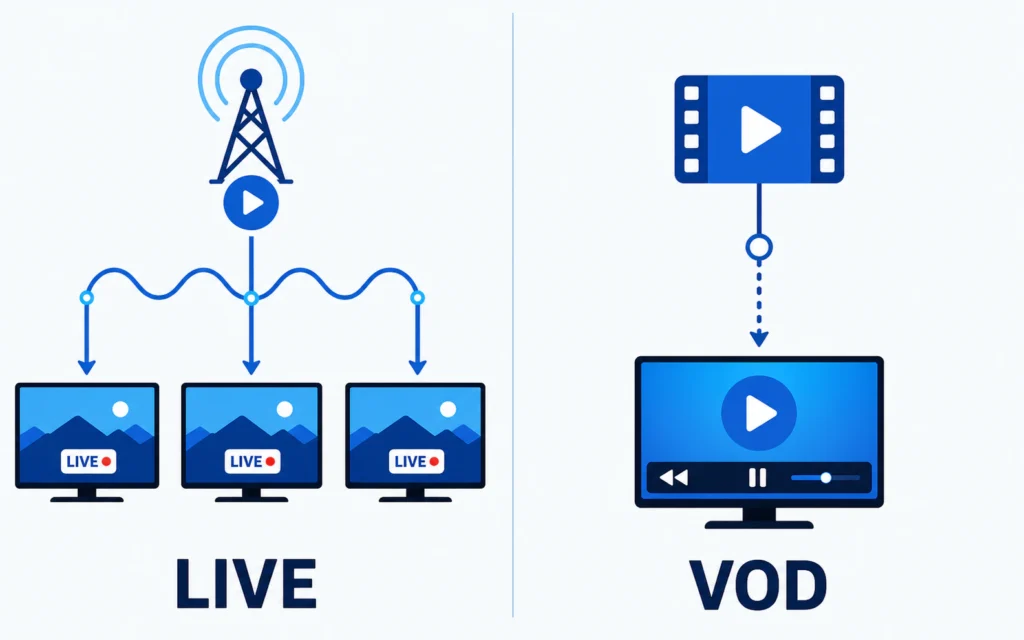
Video on demand (VOD) works differently from live TV. When you select a title, the server opens an individual stream just for you, sending the file in data packets as you watch. Because the stream is yours alone, you can pause, rewind, fast-forward, and resume — controls that aren’t possible with a shared live broadcast. This is the same on-demand model you’ll recognise from mainstream streaming apps.
What Is the Role of IPTV Servers?
IPTV servers are the engine room of the service. Their job covers several tasks at once:
- Storing and serving the VOD library.
- Processing and distributing live channels.
- Authenticating subscribers at login.
- Managing simultaneous connections.
- Supplying EPG (program guide) data.
- Selecting the right stream quality for each viewer.
- Handling load when many people watch at once.
A quick, honest caveat: capable servers improve performance, but the presence of servers alone doesn’t prove a provider is licensed or trustworthy — that depends on content rights and transparency, which we cover in our IPTV providers guide.
How Does IPTV Adjust the Picture Quality?
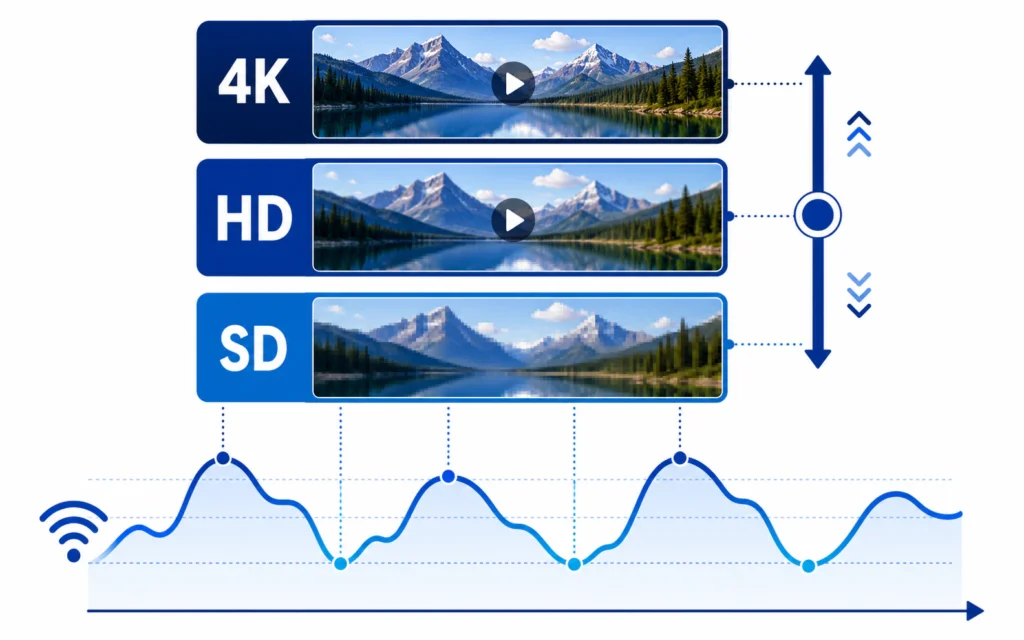
IPTV keeps playback smooth using adaptive bitrate streaming. The provider encodes the same video at several quality levels (for example 4K, 1080p, 720p, and SD). As you watch, your player constantly measures your connection and switches between those levels — stepping down if bandwidth drops and back up when it recovers. A brief, automatic dip in resolution is often what prevents a full stop, which is why a stream may soften for a few seconds rather than freeze entirely.
What Equipment Do You Need?
IPTV works on equipment most Australian homes already own. To get started you need:
- A reliable internet connection (an NBN plan in most homes).
- A smart TV or a streaming device (Firestick, Android box, Apple TV).
- An IPTV player or your provider’s app.
- An active, authorised subscription.
- Your login details (M3U URL or Xtream Codes).
- Optionally, an Ethernet cable for the most stable connection.
How Much Internet Speed Does IPTV Need?
As a practical guide, the speed that needs to be reaching your device is roughly:
- SD: about 5 Mbps
- HD (720p): about 10–15 Mbps
- Full HD (1080p): about 15–25 Mbps
- 4K / UHD: about 25–50 Mbps
One important nuance: these speeds must actually be available to the device at the time you watch — not just the headline figure on your NBN plan. Peak-hour congestion, Wi-Fi distance, and other devices all reduce what reaches your player, which is why a wired connection helps.
Why Does IPTV Buffer?
Buffering happens when your player can’t receive data fast enough to keep playing, and it usually traces back to one of these causes:
- Server load at the provider’s end during busy periods.
- Wi-Fi interference or distance from the router.
- Insufficient bandwidth for the chosen quality.
- Network congestion at peak times (typically 7–10pm).
- Device limitations on older hardware.
- Bitrate changes as adaptive streaming adjusts quality.
Most buffering is a network issue rather than a fault with the video itself — a wired connection and a local server make the biggest difference.
Is IPTV the Same as OTT Streaming?
Not quite, in the strict technical sense — though the words are often used interchangeably. True IPTV runs over a managed network with controlled bandwidth, while OTT (over-the-top) services run over the open public internet on a best-effort basis.
| Aspect | Managed IPTV | OTT streaming |
|---|---|---|
| Network | Private, managed | Public internet |
| Delivery | Often multicast | Unicast / HTTP |
| Bandwidth | Reserved | Best-effort |
| Examples | Telco TV services | Netflix, broadcaster apps |
In everyday use, most consumer “IPTV” subscriptions are technically delivered OTT over the public internet — so when people say “IPTV,” they usually mean internet-delivered live TV in the broad sense. We’ve used the term that way throughout this guide.
Does the Technology Decide Whether IPTV Is Legal?
No. The technology and the content authorisation are separate issues. IPTV is simply a delivery method; whether a service is lawful depends on whether it holds the rights to the content it streams. For the full Australian picture, see our IPTV legality guide.
Frequently Asked Questions
Do you need fast internet for IPTV?
You need enough speed reaching your device for your chosen quality: roughly 10–15 Mbps for HD and 25–50 Mbps for 4K. Just as important is stability — a wired Ethernet connection often prevents more buffering than simply buying a faster plan.
What is an IPTV server?
An IPTV server stores and distributes the video, authenticates subscribers, supplies the program guide, and manages how many people stream at once. Servers located closer to viewers can reduce latency, but they don’t, on their own, indicate that a provider is licensed.
Is IPTV the same as regular streaming?
They overlap. Strictly, IPTV uses a managed network while OTT streaming (like Netflix) uses the open internet — but most consumer IPTV services are delivered over the public internet, so the terms are often used to mean the same thing.
Why does IPTV keep buffering?
Buffering is almost always a network issue: peak-hour congestion, weak Wi-Fi, not enough bandwidth, or server load. Switching to a wired connection, lowering the quality, or choosing a provider with local servers usually resolves it.
Conclusion: From Source to Screen
Now you can see the full journey: IPTV takes a content source, compresses it with codecs, organises it on servers, delivers it through a CDN over the internet, and decodes it in an app on your screen — adjusting quality on the fly to keep things smooth. Understanding the chain also explains the everyday stuff, like why a local server helps and why buffering is usually about your network.
If you’d like to put the theory into practice on a service with local Australian servers, you can try a free 24-hour Sydney IPTV trial, or compare your options in our guide to the best IPTV in Australia.
Related Articles
You might also like

IPTV Providers Australia: Service Types, Legal Options and Red Flags
Choosing among IPTV providers in Australia can feel confusing, partly because the term covers very different kinds of services — from large…
Read article →